Roles & Permissions
Every team member has exactly one role. The role determines which actions the person is allowed to perform within the team.
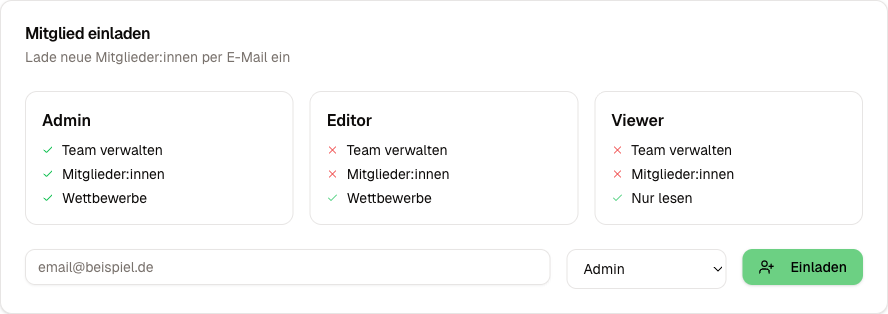
The Four Roles
Owner
The owner is the person who created the team. There is always exactly one owner per team.
Exclusive rights:
- Delete the team
- Transfer owner rights to another member
- Purchase, cancel, or switch a Supporter subscription
Admin
Admins have almost all the rights of the owner but cannot delete the team or manage the Supporter subscription.
Rights:
- Change the team name, slug, and logo
- Invite and remove members
- Change roles of other members (except the owner)
- Manage competitions, rounds, and performers
- Edit display settings (if Supporter is active)
Editor
Editors focus on the content work. They can create, edit, and moderate competitions and rounds live.
Rights:
- Create, edit, and delete competitions
- Create and configure rounds
- Run the live scoring (scorekeeper)
- Create and edit performers in the pool
- Control the display (switch screens, enter scores)
No access to: team settings, member management, Supporter subscription
Viewer
Viewers have read-only access. They can see all competitions, rounds, and results but cannot change anything.
Rights:
- View competitions and rounds
- View results and standings
- View the performer pool
Permissions Matrix
| Action | Owner | Admin | Editor | Viewer |
|---|---|---|---|---|
| Change team name/slug/logo | Yes | Yes | No | No |
| Invite/remove members | Yes | Yes | No | No |
| Change roles | Yes | Yes | No | No |
| Create/edit competitions | Yes | Yes | Yes | No |
| Create/edit rounds | Yes | Yes | Yes | No |
| Run live scoring | Yes | Yes | Yes | No |
| Manage performers | Yes | Yes | Yes | No |
| Display settings (Supporter) | Yes | Yes | No | No |
| Manage Supporter subscription | Yes | No | No | No |
| Owner transfer | Yes | No | No | No |
| Delete team | Yes | No | No | No |
Without an Account via Link
Helpers on the evening itself do not need an account. There are three links; Owner, Admin and Editor create all of them:
- Live control link: start and end rounds, scores, tiebreakers, screen and texts, only for this competition. In the competition settings, more in Live Control.
- Live control link for this round: the same for exactly one round. Under Edit or in the live control of the round, more in Link for a Single Round.
- Link for an operator: only page through texts. In the competition settings, more in Texts and Translations.
Both links can be renewed or deleted at any time; the previous link then stops working right away.
Examples
Poetry slam organizer with helpers: You are the owner. Your co-hosts get the editor role so they can create their own competitions and score live. Your sponsoring partner gets viewer access to follow along with the results.
Cultural organization with a regular crew: The board chair is the owner. Other board members become admins. The hosts for individual slam nights get the editor role.